Smart Bible apps · Android
How to change app behaviour
Choose the interface language, keep the screen awake and configure reading controls in Smart Bible for Android.
Smart Bible team · For version 4.x
Button names match the English interface; screenshots show the English interface.
On this page
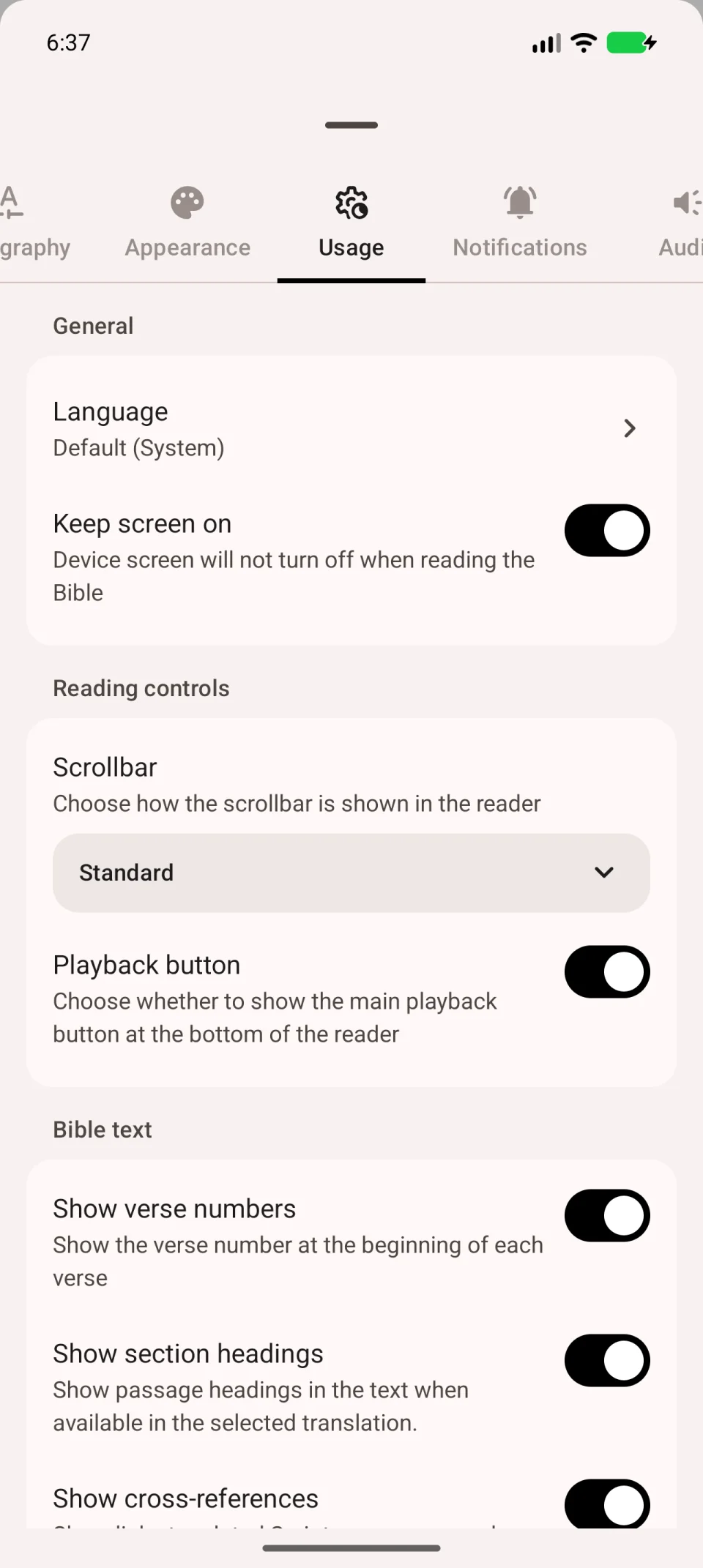
Under Usage, choose the menu language, keep the screen on and configure reading elements. Open More → Settings → Usage.
Change the menu language
- Tap Language under Usage.
- Choose a language. Default (System) follows your device.
- Check the menu labels after changing it.
Interface language and Bible language are separate. If menus use your language but the chapter does not, switch the Bible translation.
Keep the screen on
Enable Keep screen on if the screen goes dark while reading. Disable it to use Android’s normal screen timeout again.
Configure reading controls
- Scrollbar controls how the bar at the edge of the text appears.
- Playback button shows or hides the main speech button at the bottom of the reader.
Check this switch if the audio button disappears. Voice and speed settings are on the separate Audio tab.
Choose what the text displays
Scroll down the same tab to Bible text settings:
| Setting | Result |
|---|---|
| Show verse numbers | Displays numbers before verses. |
| Show section headings | Displays headings included in the translation. |
| Show cross-references | Displays references to related passages. |
| Show translation notes | Displays explanations supplied with the translation. |
Return to the chapter after changing settings. References, headings and notes appear only if the translation contains them. See footnotes and references to open them.
Repeat guided tips
Open More → How to use the app to find the main actions again. Change letter size and colours separately under text and appearance.